
Protect
Keep a copy of every photo you can't retake
Phones get lost, broken and traded in. With Clickfree, your photos and videos also live on a small device you keep at home or take with you.


Every photo and video, backed up in one tap.
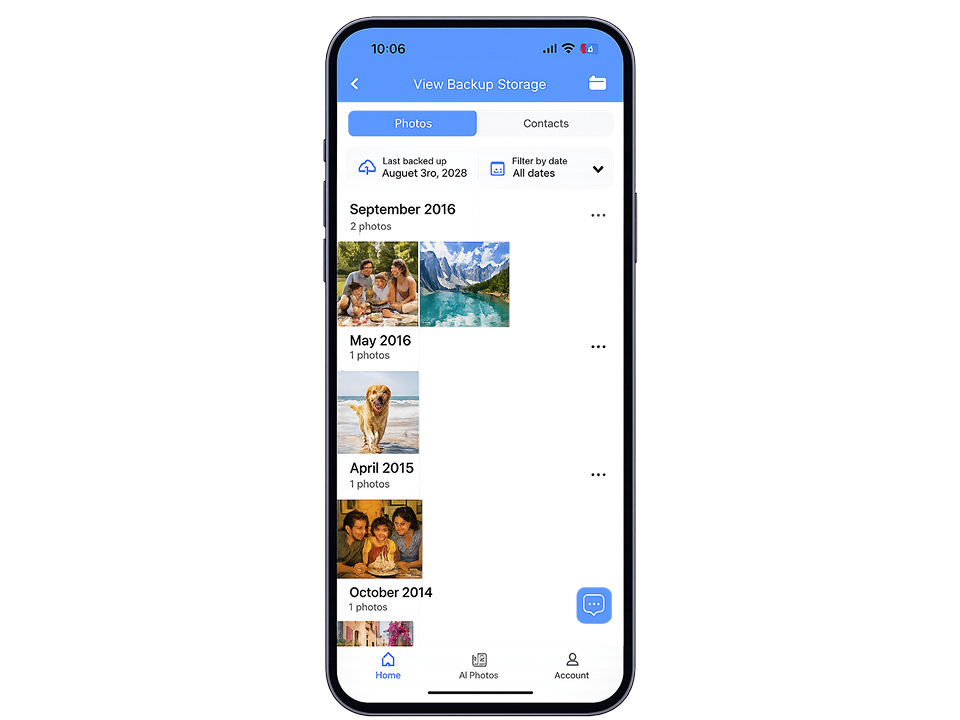
Plug Clickfree Pro into your phone, tap Backup, and your memories are saved on a device you keep. No cloud subscription and no monthly fees.
 Works with all your devices
Holds 30,156 photos or 13 hours of video
Your phone keeps its photos until you choose to clear space
Works with all your devices
Holds 30,156 photos or 13 hours of video
Your phone keeps its photos until you choose to clear space
Or 4 interest-free payments with Shop Pay
Delivery and support
 Free US shipping, 3 to 4 days
 30-day returns and a 1-year limited warranty
 Free technical support
 Secure checkout with Shop Pay, PayPal, Google Pay or card
Overview
Plug Clickfree Pro into your phone, tap Backup, and your memories are saved on a device you keep. No cloud subscription and no monthly fees.
Works with all your devices
Holds 30,156 photos or 13 hours of video
Your phone keeps its photos until you choose to clear space

How it works
Clickfree remembers what it has already saved, so every backup after the first only adds what is new.

Use the tip that fits your phone: Lightning, USB-C or Micro-USB. No cables or adapters.

Get it on the App Store or Google Play. On iPhone, the app usually opens when you connect. If not, tap it.

Photos, videos and contacts copy over to Clickfree. Your phone keeps its own copies.

First big backup? Set your phone's Auto-Lock to Never so the screen stays on. If a backup gets interrupted, Clickfree picks up where it left off.
Why people buy it
Protect
Phones get lost, broken and traded in. With Clickfree, your photos and videos also live on a small device you keep at home or take with you.
Free up space
Move big videos and old photos onto Clickfree, then clear them from your phone when you're ready. You can also shoot new photos and video straight to Clickfree.

Transfer
Back up from your iPhone, then plug the same Clickfree into your Mac or PC with the USB-A tip. It works the same way with Android phones and tablets.

No subscription
Cloud storage charges every month for as long as your photos live there. Clickfree Pro is a single purchase, and your backups stay on a device you keep.
Scan
Scan printed photos with your phone's camera. The app finds the edges and crops them, then you save them to Clickfree. Optional Clickfree AI tools, paid with credits, can restore and colorize old photos.

Compatibility and storage
Four tips are built in, so there is nothing extra to carry.


Not sure how much you need? Your phone's Photos app shows how many photos and videos you have.
Real people, real phones
Short videos from people who use Clickfree at home.
What owners say
4.1 out of 5 from 15 reviews on this page.
Is it hard to set up?
Very easy to use even for not tech savvy person.
Joanna E.· Review on clickfree.com · 5 stars
Can it free up space on my phone?
This is a great way to free up space and preserve your photos. I also backed contacts in case I ever lose them. I highly suggest trying the click.
Robin· Review on clickfree.com · 5 stars
Can I use it with more than one device?
I have so many pictures stored on my iPhone, iPad and Mac. Now they can all be stored on one small and compact device. I wish I had bought this sooner.
E. Jones· Review on clickfree.com · 5 stars
What about old printed photos?
Now I'm saving all my photos and scanning old photos. No need for photo albums anymore.
Don H.· Review on clickfree.com · 5 stars
 Free technical supportOur support team is here to help, free of charge.
 Setup guidesStep-by-step guides in our online Help Center.
 30-day returnsNot the right fit? Start a return within 30 days.
 1-year limited warrantyCovers manufacturing defects for one year from purchase.
FAQ
Can't find what you need? Our support team is free to use.
Visit our Help Center Free US shipping, 3 to 4 days
Pairs well with your Clickfree Pro


